

What Is CRM (Customer Relationship Management)?

Heading 1
Heading 2
Heading 3
Heading 4
Heading 5
Heading 6
Lorem ipsum dolor sit amet, consectetur adipiscing elit, sed do eiusmod tempor incididunt ut labore et dolore magna aliqua. Ut enim ad minim veniam, quis nostrud exercitation ullamco laboris nisi ut aliquip ex ea commodo consequat. Duis aute irure dolor in reprehenderit in voluptate velit esse cillum dolore eu fugiat nulla pariatur.
Block quote
Ordered list
- Item 1
- Item 2
- Item 3
Unordered list
- Item A
- Item B
- Item C
Bold text
Emphasis
Superscript
Subscript

What Is CRM (Customer Relationship Management)?
.png)
Karthik A
Join us on November 6th as Mr. Yash Mishra, Product Manager, Fatakpay, reveals the precise strategies that eliminates the speed trap and guarantees a 30% conversion boost.
What is CRM?
Customer relationship management (CRM) is a system that helps businesses manage all their customer interactions in one place. It acts as a central source of truth where teams can access customer details, track conversations, and stay updated on every deal or inquiry without relying on memory or scattered tools. Gartner predicts that by 2029, agentic AI will handle 80% of common customer service issues on its own, cutting operational costs by 30%.
At a functional level, a CRM captures customer information, logs interactions like calls and emails, and organizes leads into a structured sales pipeline. It also helps teams set follow-ups, automate routine tasks, and get visibility into what is working and what is not, making day-to-day operations more predictable and less chaotic.
As an example, imagine a small business handling enquiries from multiple channels like calls, WhatsApp, and social media. Without a CRM, details get lost, follow-ups are missed, and customers often repeat themselves, which creates a poor experience. With a CRM, every interaction is recorded, every lead is tracked, and the team knows exactly what needs to happen next.
The core components of CRM work together to streamline customer management:
- Contact management – Stores and organizes all customer information in one place
- Lead management – Captures and tracks potential customers through the funnel
- Sales pipeline – Visualizes deal stages and tracks progress toward closure
- Activity tracking – Records calls, meetings, emails, and notes
- Task & reminders – Ensures timely follow-ups and next actions
- Automation – Reduces manual work through predefined workflows
- Reporting & analytics – Provides insights into performance and conversions
To understand how we got here, explore the history and evolution of CRM.
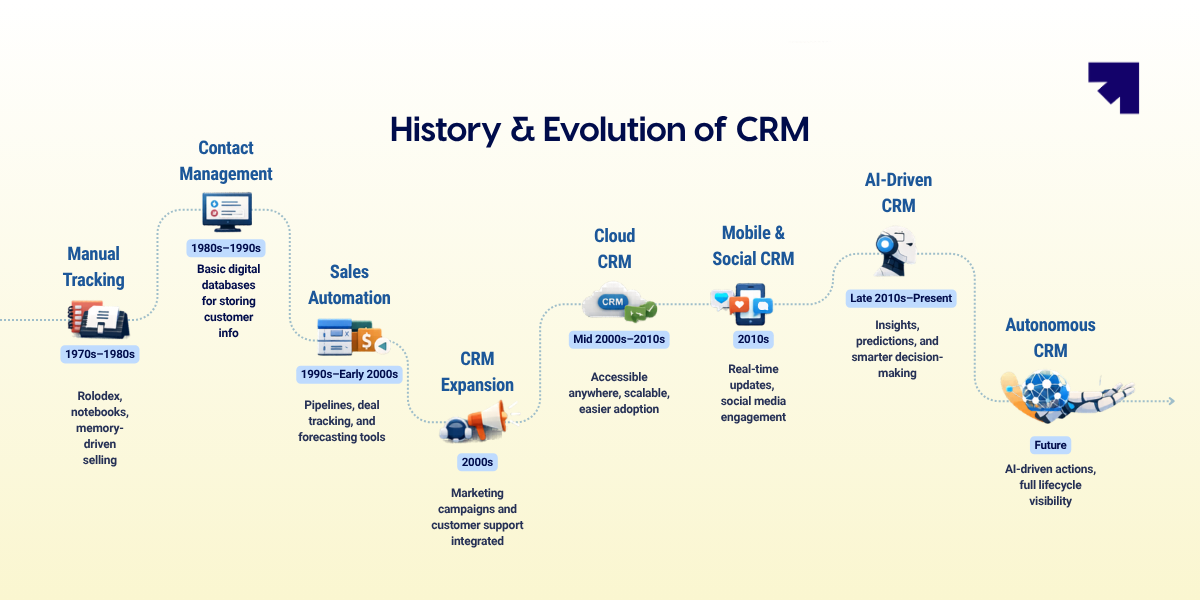
Why is a CRM system important for your business?
As customer conversations increase, managing them through emails, spreadsheets, and personal notes quickly becomes difficult. Leads come from different channels, deals move at different speeds, and multiple team members may interact with the same customer.
A customer relationship management software becomes important because it brings structure and visibility to how businesses manage customer relationships and revenue activities.
Key reasons why CRM is important for businesses:
- Centralized customer information: Keeps all customer details, conversations, and deal updates in one system instead of scattered across tools.
- Clear sales pipeline visibility: Helps teams track how deals are progressing and identify opportunities that need attention.
- Consistent follow-ups: Ensures prospects receive timely responses and conversations do not get forgotten.
- Better team coordination: Allows sales, marketing, and support teams to access the same customer information.
- Improved decision making: Provides insights into pipeline health, sales performance, and customer trends.
When customer interactions start increasing, relying on manual tracking becomes unreliable. A CRM provides the structure businesses need to manage relationships, maintain visibility into opportunities, and support sustainable growth.
.png)
How does a CRM system work?
To understand how a CRM software works, it helps to look at how information flows through the system and how it connects teams across the entire customer lifecycle. Fundamentally, CRM systems are not just storing data, they are continuously moving, enriching, and activating it.
Here are eight steps that explain how CRM works.
Step 1: Capturing data
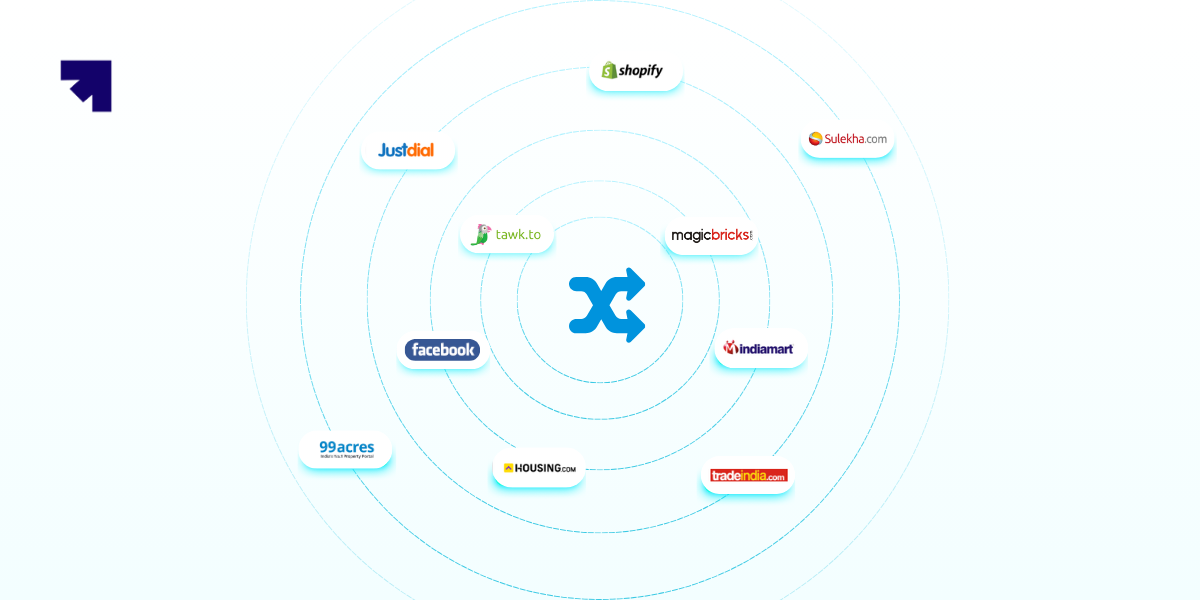
The CRM process begins with capturing customer data from multiple touchpoints. This includes websites, landing pages, social media, email campaigns, chatbots, inbound calls, and even offline interactions. A CRM collects and organizes this data automatically so no lead or customer detail is lost.
For example, if a prospect fills out a form on a real estate website, the CRM captures their details, records their interest, and assigns the lead to the right sales representative.
Data gets automatically captured through integrations, reducing manual entry and improving accuracy.
Step 2: Storing and organizing data
Once captured, the data is stored in a centralized system. Unlike spreadsheets or siloed tools, CRM systems ensure that all customer information is updated in real time and accessible to authorized teams.
This creates a single source of truth, so sales, marketing, and support always work with consistent and reliable data.

Step 3: Enriching and qualifying data
Raw data alone is not enough. A CRM helps enrich and qualify data by adding context such as lead source, behavior, engagement level, and intent signals.
This allows teams to prioritize better, focus on high-quality leads, and avoid wasting time on low-intent prospects.
Step 4: Automating workflows
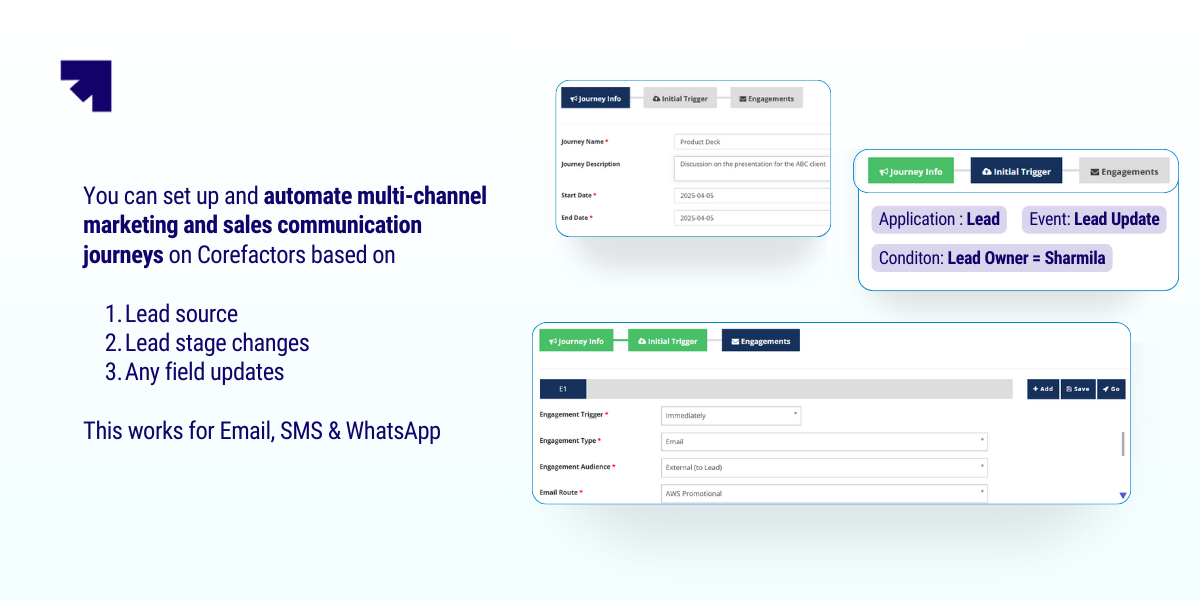
A CRM goes beyond storage by automating repetitive tasks. This includes sending follow-up emails, assigning leads, creating support tickets, and setting reminders.
Automation improves speed and consistency while reducing manual effort, allowing teams to focus more on conversations and decision-making.
Step 5: Tracking interactions across the lifecycle
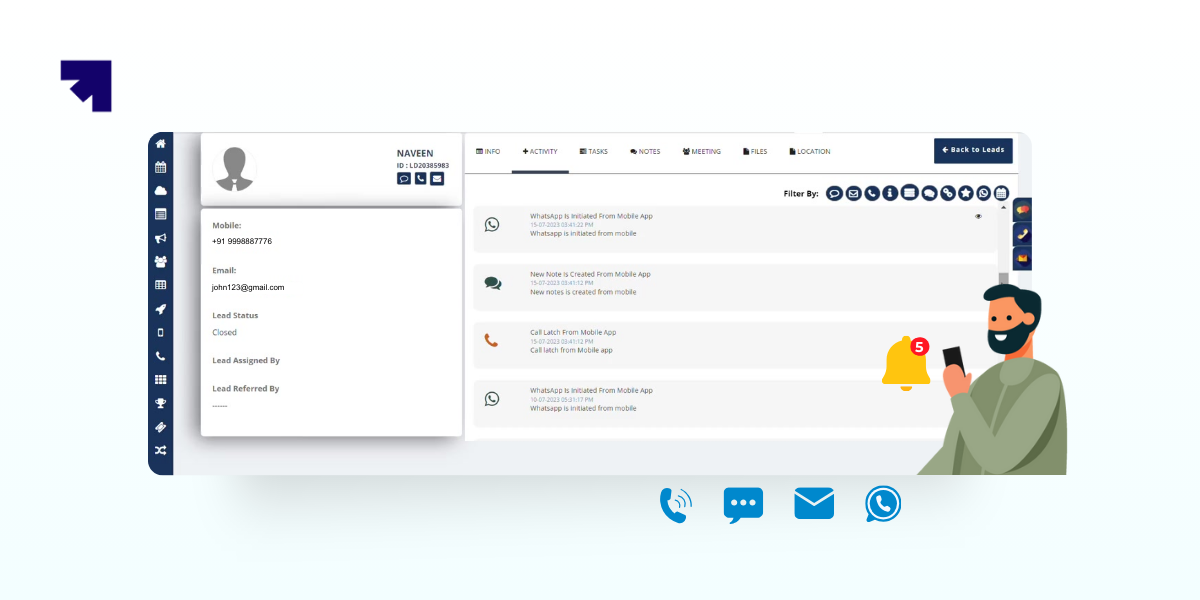
Every interaction a customer has with your business is recorded in the CRM. From the first touchpoint to post-sale support, the system builds a complete history of engagement.
This helps teams respond with context. For instance, a support agent can view past purchases and conversations, making interactions faster and more relevant.
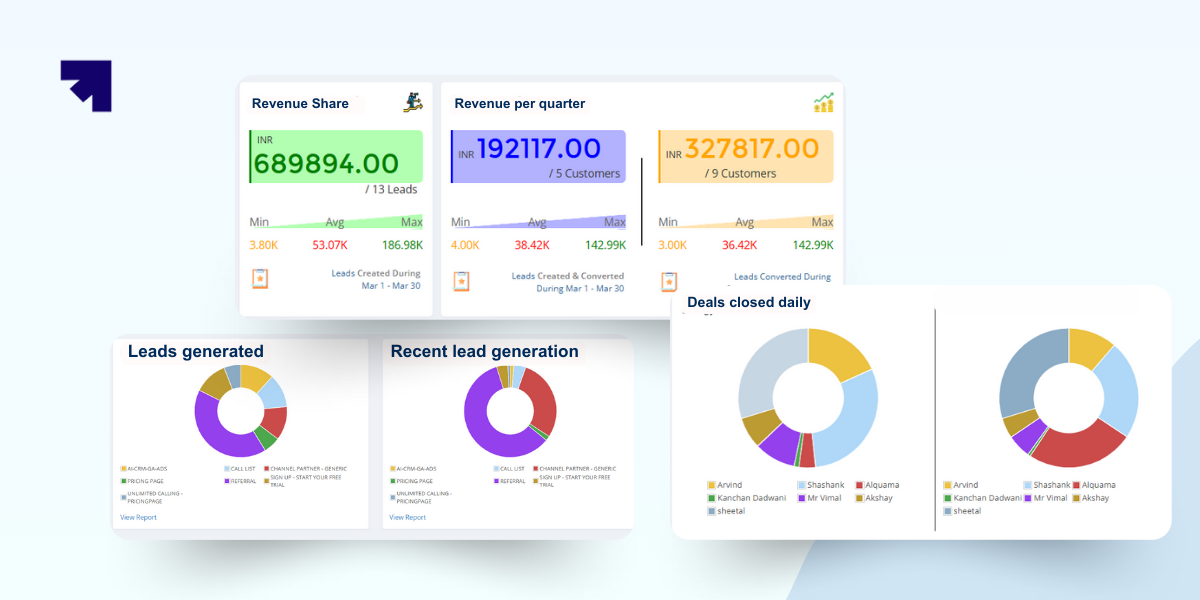
Step 6: Analyzing data for insights
A CRM transforms activity into insights through reports and dashboards. Businesses can track performance, identify trends, and understand what is working.
This could include identifying high-performing campaigns, measuring sales conversion rates, or spotting drop-offs in the pipeline.
Step 7: Turning insights into action
Insights only matter if they lead to action. A CRM helps teams translate data into decisions that improve outcomes across sales, marketing, and customer success.
For example, if a region shows higher demand, teams can focus efforts there. If churn patterns appear, proactive retention strategies can be introduced.
Step 8: Continuous feedback loop
A CRM is not a one-time system. It operates as a continuous loop where every new interaction generates data, which is analyzed and used to refine future actions.
Over time, this creates a system that becomes smarter, more aligned, and more effective at managing customer relationships.
4 Types of CRM systems
Not all CRM systems are built the same. What you need depends on how your sales, marketing, and customer processes actually work. As customer journeys become more complex, CRM platforms have evolved to serve different purposes.
Here are the four types of CRM systems.
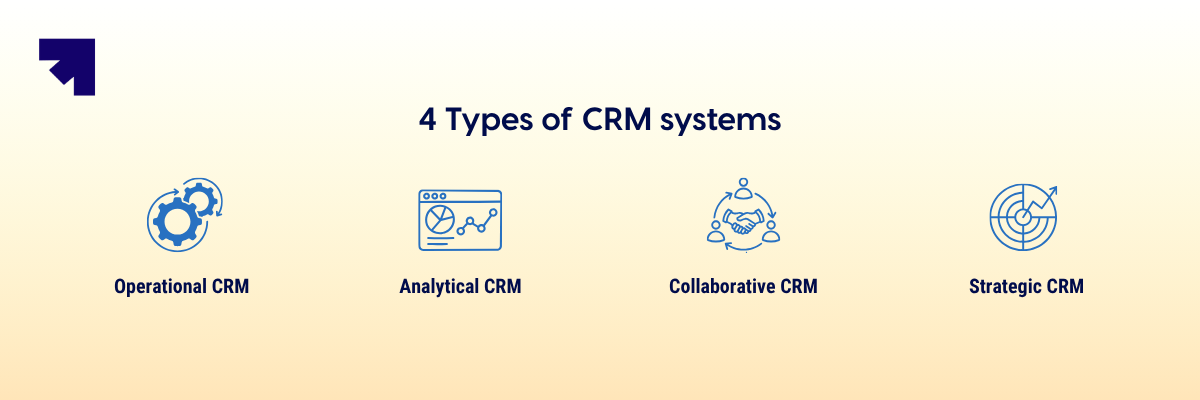
1. Operational CRM
Operational CRM focuses on execution. It helps teams manage day-to-day customer interactions across sales, marketing, and support. The goal is simple. Reduce manual effort and ensure every lead and customer is handled consistently.
Key capabilities include:
- Sales automation – Track leads, manage pipelines, and move deals faster
- Marketing automation – Run targeted campaigns and nurture leads at scale
- Service automation – Manage support tickets and streamline responses
Best for: Businesses that want to improve team productivity and avoid missed follow-ups.
For example, a real estate company can capture enquiries, schedule site visits, and automate follow-ups without relying on manual tracking.
2. Analytical CRM
Analytical CRM focuses on insights. It helps you understand what is happening across your funnel and why. Instead of just storing data, it turns customer information into actionable intelligence.
Key capabilities include:
- Customer segmentation – Group users based on behavior, profile, or intent
- Sales forecasting – Predict revenue trends and pipeline outcomes
- Churn analysis – Identify drop-offs and improve customer retention strategies
Best for: Teams that want to make data-backed decisions instead of relying on assumptions.
For example, a bank can analyze spending patterns to identify customers likely to buy new financial products and target them effectively.
3. Collaborative CRM
Collaborative CRM focuses on alignment. It ensures that every team interacting with the customer is on the same page. This becomes critical when multiple teams handle different parts of the customer journey.
Key capabilities include:
- Shared customer data – One unified view across sales, marketing, and support
- Multi-channel communication – Consolidates interactions from calls, email, chat, and social
- Customer history visibility – Gives full context before every interaction
Best for: Businesses where multiple teams need to coordinate closely.
For example, in the automobile industry, sales teams, service centers, and parts suppliers can stay aligned and deliver a consistent customer experience.
4. Strategic CRM
Strategic CRM focuses on long-term relationships. It goes beyond transactions and looks at how to increase customer lifetime value. The emphasis is on personalization, retention, and loyalty.
For example, a retail brand can use strategic CRM to design loyalty programs, offer personalized discounts, and drive repeat purchases over time.
In reality, most modern CRM platforms combine elements of all four types.
The right choice is not about picking one category, but about ensuring your CRM supports execution, insights, collaboration, and long-term growth together.
CRM systems like Corefactors follow this approach by bringing sales, marketing, support, and customer success into a single system, helping businesses manage daily operations while also improving visibility and customer relationships at scale.
Who needs customer relationship management (CRM)?
If your business interacts with customers in any structured way, you will eventually need a CRM.
Roughly 91% of companies with 10 or more employees use Customer Relationship Management (CRM) software. It is less about company size and more about how complex your customer flow is becoming, because once leads, conversations, and follow-ups start increasing, managing them without a system quickly becomes unreliable.
- Small Businesses & Startups: When enquiries start coming from multiple channels and you are juggling sales, marketing, and follow-ups manually, a CRM helps capture leads, track conversations, and ensure no opportunity slips through the cracks
- Mid-Sized Enterprises: As teams grow, different people handle sales, marketing, and support, which creates gaps in communication; a CRM brings shared visibility, aligns handoffs, and helps track pipeline, campaigns, and customer history in one place
- Large Multinational Organizations: At scale, consistency becomes the challenge, not effort; a CRM standardizes processes across regions, gives leadership visibility into performance, and ensures every customer interaction follows a structured system
- Solopreneurs: Even if you are working alone, once you handle multiple leads, ongoing conversations, and repeat customers, it becomes hard to rely on memory; a CRM acts as your personal system to track deals, schedule follow-ups, and manage relationships without things falling through
In short, the moment your business starts depending on repeatable customer interactions instead of one-off transactions, a CRM shifts from being optional to essential.
Signs you might need a CRM
- You rely on memory or scattered notes for follow-ups
- Leads come from multiple channels and feel hard to track
- Customers repeat the same information again and again
- You miss follow-ups or lose potential deals
- Your team lacks visibility into customer conversations
- You cannot clearly see your sales pipeline or performance
If these feel familiar, a CRM is not a luxury. It is a necessary step toward building a more reliable and scalable process.

7 Key benefits of CRM
CRM benefits are best understood by how they improve everyday business outcomes.
While features define what a CRM can do, benefits reflect what actually changes for your team and customers. According to research from Nucleus Research, CRM systems provide an average return of $8.71 for every $1 spent
Here are the seven key benefits of CRM that businesses typically see after implementing a CRM:
1. Better lead management
A CRM helps you capture leads from multiple channels and bring them into a single system with proper attribution. This gives you clarity on where leads are coming from, how they are distributed, and which ones are worth prioritizing, instead of treating every inquiry the same.
Also read: What is a Lead Management System?
2. Improved follow-ups and consistency
Follow-ups no longer depend on memory or individual discipline. With reminders, activity tracking, and automated nudges, every lead is engaged at the right time, which reduces drop-offs and creates a more consistent buying experience.
3. Higher sales productivity
Sales teams spend less time updating spreadsheets or searching for information and more time having meaningful conversations. By reducing manual work and standardizing workflows, a CRM improves output without increasing effort.
4. Clear pipeline visibility
A CRM gives you a structured view of every deal across stages. This makes it easier to identify where deals are getting stuck, how long cycles are taking, and what actions are needed to move opportunities forward.
5. Stronger customer relationships
Every interaction is backed by context, including past conversations, preferences, and history. This allows teams to engage customers in a more relevant and personalized way, which builds trust over time.
6. Better team collaboration
Instead of working in silos, teams operate on shared data and visibility. Sales, marketing, and support can align on the same customer journey, reducing miscommunication and ensuring smoother handoffs.
7. Data-driven decision making
A CRM replaces guesswork with actual performance data. Businesses can track conversion rates, campaign effectiveness, and team performance to make informed decisions rather than relying on assumptions.
In practice, a CRM is not just a tool for managing customers. It becomes the foundation for building a more predictable, efficient, and scalable way to grow revenue.
Also read: Top 10 Benefits of CRM Software in 2026
.png)
CRM features to consider before you invest
When evaluating a customer relationship management software, it is easy to get lost in long feature lists. Not every capability matters on day one, and trying to use everything at once often creates more confusion than value.
A better approach is to focus on the core features that help you organize customer data and manage interactions effectively. Once those are in place, you can layer in advanced capabilities that improve efficiency, insights, and scale as your business grows.
Must-have CRM features
These are the foundational capabilities every CRM should offer. Without them, the system cannot reliably support your day-to-day customer management.
Contact management: A centralized place to store customer details, interaction history, and preferences.
1. Lead and opportunity management: Capture leads, assign them to reps, and track their journey through the pipeline.
2. Task and activity tracking: Set reminders and log calls, meetings, and emails so no follow-up is missed.
3. Pipeline management: A visual view of deals across stages to help teams track progress and forecast revenue.
4. SMS and email integration: Communicate with prospects and customers directly from within the CRM.
5. Reporting and dashboards: Access basic insights on sales performance, interactions, and conversions.
6. Mobile CRM: Access your CRM on the go through a mobile CRM app, typically powered by cloud CRM infrastructure, so teams can update data, track activities, and respond to customers from anywhere. According to CRM.org, 65% of sales teams using mobile CRM meet their quotas, compared to just 22% without it.
Advanced CRM features
Once the basics are running smoothly, advanced features help you scale operations and improve decision-making. These capabilities add depth by bringing automation, intelligence, and better coordination across teams.
1. Marketing automation: Run campaigns, nurture leads, and test messaging with A/B experiments.
2. Customer support ticketing: Track, assign, and resolve customer issues in a structured way.
3. AI-powered insights: Use predictive analytics for lead scoring, churn analysis, and forecasting.
4. Multi-channel communication: Manage conversations across RCS chats, social media, WhatsApp, and telephony.
5. Workflow automation: Automate repetitive actions like follow-ups or ticket creation.
6. Customer segmentation: Group customers based on behavior, demographics, or transaction history.
7. Integration capabilities: Connect with tools like marketing platforms, support systems, and communication tools like WhatsApp to keep data in sync across systems.
8. Customer success management: Track customer satisfaction, manage renewals, and reduce churn over time.
9. Data security and compliance: Ensure data protection with role-based access, encryption, and regulatory compliance.
10. Customizable dashboards: Create role-based views that highlight the metrics each team cares about.
In practice, the right CRM is not the one with the most features. It is the one that covers your current needs well and can expand with you as your processes become more structured and data-driven.
What are some examples of CRM?
CRM is best understood through how it works across different functions in a business.
It is not just a tool for one team. It acts as a shared system that supports sales, marketing, and customer service with a unified view of the customer.
Here is how CRM plays out in real scenarios:
1. What is CRM in sales?
In sales, a CRM acts as a pipeline and deal management system.
It helps sales teams track leads, manage conversations, and move opportunities toward closure in a structured way.
For example, when a new enquiry comes in, it is captured in the CRM and assigned to a sales rep. The rep can see past interactions, schedule follow-ups, update deal stages, and track progress until the deal is closed, without losing context or missing steps.
2. What is CRM in marketing?
In marketing, a CRM acts as a lead capture and nurturing engine.
It helps teams manage campaigns, segment audiences, and track how leads engage before they are ready to buy.
For example, leads from ads, website forms, or events flow into the CRM. Marketing teams can segment these leads, send targeted email campaigns, and track engagement, which helps qualify leads before passing them to sales.
3. What is CRM in customer service?
In customer service, a CRM acts as a support and relationship management system.
It helps teams track issues, manage requests, and ensure every customer interaction is handled with full context.
For example, when a customer raises a support request, the CRM logs the issue, assigns it to an agent, and provides access to past interactions. This allows the team to resolve problems faster without asking the customer to repeat information.
In short, a CRM connects all three functions. Sales knows what marketing has done, support knows what sales has promised, and the customer experiences a more consistent and informed interaction at every stage.
CRM vs. Other Business Tools
Businesses often confuse CRM with other customer-focused or enterprise tools, especially since many of them share overlapping features. However, each system is built for a specific purpose and plays a different role in the overall business stack.
To make this clearer, here is a quick comparison of how CRM differs from and works alongside other key platforms:
- CRM vs. CDP (Customer Data Platform)
- CRM vs. Marketing Automation Platform (MAP)
- CRM vs. Helpdesk / ITSM (IT Service Management)
- CRM vs. ERP (Enterprise Resource Planning)
| Tool | Primary Purpose | Strengths | Where CRM Fits In | Overlap / Integration |
|---|---|---|---|---|
| CRM (Customer Relationship Management) | Manages customer interactions across sales, marketing, and support | Lifecycle ownership, pipeline visibility, complete customer history, revenue workflows | Acts as the central hub for all customer-facing teams | Connects with CDP, MAP, ERP, and helpdesk systems |
| CDP (Customer Data Platform) | Collects and unifies customer data across multiple channels | Single customer view, segmentation, behavioral insights | CRM uses CDP data to enrich customer profiles and interactions | CRM + CDP = Stronger personalization and targeting |
| MAP (Marketing Automation Platform) | Runs campaigns, nurtures leads, and tracks marketing performance | Email automation, drip campaigns, campaign analytics | CRM receives qualified leads and manages them through the sales lifecycle | CRM + MAP = End-to-end lead management |
| Helpdesk / ITSM (IT Service Management) | Manages customer issues, tickets, and service-level agreements | Faster response times, structured case resolution, support performance tracking | CRM provides full customer context to support teams for better resolution | CRM + Helpdesk = Unified customer experience across sales and support |
| ERP (Enterprise Resource Planning) | Manages back-office operations like finance, inventory, and HR | Operational efficiency, resource planning, financial control | CRM handles front-office interactions while ERP manages internal operations | CRM + ERP = Complete visibility from customer to operations |
Key differentiators of CRM
The real difference with a CRM is not the features, it is the ownership of the customer lifecycle. Most tools do one job well, like running campaigns, storing data, or resolving tickets, but a CRM sits where revenue actually moves. It connects intent to action by showing what needs to happen next for each customer, not just what already happened. Unlike other systems that are passive or reactive, a CRM is operational and decision-driven. It is where teams align, priorities become visible, and outcomes like conversions and retention are actively managed.
How to build a successful CRM strategy?
A CRM strategy is not about setting up a tool. It is about designing how your business moves a customer from first touch to long-term value. Most teams fail here because they configure features before they define behavior. So the system looks complete, but the execution still feels broken.
Here is how to build a CRM strategy that actually drives outcomes:
1. Start with your customer journey, not your funnel
Funnels look clean on slides, but real customer journeys are messy. Map how leads actually enter, how decisions are made, and where delays happen. Where do deals slow down? Where do customers disengage? Your CRM should reflect reality, not a theoretical flow. If your journey map is wrong, your CRM will only scale confusion faster.
2. Define stages based on actions, not labels
“Qualified” or “Interested” sounds good, but what do they mean operationally? Each stage should be tied to a clear action or milestone, like a meeting completed or proposal shared, so movement in the CRM reflects real progress, not guesswork.
Clarity in stages removes ambiguity in execution.
3. Treat follow-ups as a system, not a habit
Most teams think follow-ups fail because of discipline. They fail because there is no system. Build your CRM so every deal has a next step, a timeline, and visibility, making inaction obvious rather than invisible.
What gets tracked gets done, what stays invisible gets ignored.
4. Capture intent, not just information
Many CRMs are filled with static data that no one uses. Instead of collecting everything, focus on what helps you act. What does the customer want? How urgent is the need? What is blocking the decision? Actionable data drives movement, not just storage.
5. Align teams around one version of truth
Marketing generates leads, sales converts them, and support retains them. But are they working from the same context? A strong CRM strategy removes these gaps and ensures every team sees the same customer story. Misalignment is often a data problem, not a people problem.
6. Automate friction, not relationships
Automation is often overused in the wrong places. Automate repetitive tasks like reminders and assignments, but keep human judgment in conversations where context and timing matter most.
Efficiency should not come at the cost of relevance.
7. Build visibility around bottlenecks, not just performance
Most dashboards show outcomes like revenue or conversions. That is useful, but late. A better CRM strategy highlights where deals are stuck, where response times lag, and where follow-ups break. You cannot fix what you cannot see early.
8. Make the CRM part of daily work, not a reporting tool
If your team updates the CRM at the end of the day, it is already failing. The system should be where work happens, not where it is recorded after the fact. Real-time usage creates real-time control.
9. Design for adoption, not completeness
A perfectly configured CRM that no one uses is worse than a simple one that everyone follows. Keep it lean, reduce friction, and build habits before adding complexity. CRM adoption drives value, not feature count.
10. Evolve the system as your business matures
Your first CRM setup will not be perfect. And it should not be. As your sales motion, team size, and customer expectations change, your CRM strategy should adapt with them. A static CRM strategy quickly becomes outdated.
In the end, a successful CRM strategy is not about managing data. It is about managing momentum. If your CRM clearly shows what needs to happen next, who owns it, and where things are slowing down, it stops being a system you maintain and becomes a system that drives growth.
Common CRM implementation challenges and how to overcome them
Implementing a CRM is not just a tech upgrade. It is a shift in how your team works, tracks, and makes decisions every day. That is why most failures are not because the CRM is weak. They happen because existing habits, messy data, and unclear goals carry into a new system.
Here are the most common challenges and how to deal with them practically:
Here are the most common ones and how to handle them:
- User resistance and low adoption: Teams often see CRM as extra work or something to update later
How to fix: Show quick wins early, train using real scenarios, and make gaps visible so nothing gets ignored - Poor data quality and migration – Old spreadsheets bring duplicates, missing data, and inconsistencies
How to fix: Clean data before migration, start with active records, and set clear rules for data entry - Integration complexity – Systems don’t sync properly, leading to manual work and confusion
How to fix: Start with essential integrations, test with real use cases, and keep things simple - Over-customization and complexity – Trying to replicate every old process makes the system hard to use
How to fix: Begin with standard workflows and customize only where it truly adds value - Lack of clear objectives and ROI – Without defined goals, CRM becomes just another tool
How to fix: Set clear outcomes, track meaningful metrics, and review progress regularly - Cost overruns – Costs increase due to unused features and unnecessary complexity
How to fix: Start lean, scale based on usage, and focus on value instead of features
In the end, CRM success is less about the software and more about how well your team adopts it. Get the process right, and the system will start delivering results.
CRM implementation is less about installing a system and more about changing how work gets done. If you simplify processes, clean your data, and align your team early, most challenges become manageable before they turn into problems.
CRM use cases: How businesses use CRM to grow revenue
While the core function of CRM is to manage customer relationships, the way it is applied can vary greatly across industries. Each sector has unique challenges and customer expectations, and a well-implemented CRM adapts to those needs. Below is a breakdown of how different industries leverage CRM to achieve efficiency, compliance, and growth.
1. Banking, Financial Services, and Insurance (BFSI)
In BFSI, trust and timely service are everything. Customers expect seamless transactions, personalized offers, and quick resolution of queries.
Financial CRM helps in:
- Lead and Customer Onboarding: CRMs streamline KYC verification, loan applications, and policy issuance.
- Cross-Selling and Upselling: Data insights help banks and insurers recommend new products, such as credit cards, mutual funds, or add-on coverage.
- Compliance and Security: CRMs ensure data handling aligns with regulatory requirements.
- Customer Support: Proactive alerts for payment due dates, loan renewals, or investment opportunities.

2. Manufacturing
Manufacturers often manage complex supply chains and large dealer or distributor networks. Manufacturing CRM ensures smoother coordination and stronger relationships.
- Distributor and Dealer Management: Track sales orders, payments, and inventory at scale.
- Forecasting Demand: CRM analytics help predict production needs based on past orders.
- Customer Support for B2B Clients: Service requests from distributors and industrial buyers are handled systematically.
- After-Sales Service: Installation, maintenance, and warranty claims are managed seamlessly.

3. Automobile
The automobile industry relies heavily on nurturing leads and maintaining long-term service relationships.
- Lead Management: CRMs capture leads from dealerships, websites, and campaigns.
- Test Drive Scheduling: Automated reminders and follow-ups ensure customers show up.
- After-Sales Engagement: Vehicle servicing reminders, insurance renewals, and accessory promotions are managed via CRM.
- Customer Loyalty: Repeat purchases and trade-ins are encouraged with personalized offers.
4. Real Estate
Real estate transactions involve long sales cycles and multiple touchpoints. Real estate CRM helps track every step.
- Lead Segmentation: Differentiate prospects by property type, budget, or location preference.
- Pipeline Tracking: Monitor which stage of the property purchase journey each prospect is in.
- Documentation: CRMs store contracts, legal documents, and customer records securely.
- Post-Sale Engagement: Maintain long-term relationships for property resale or rentals.

5. Education and EdTech
Educational institutions and EdTech companies rely on timely communication and personalized engagement with students and parents.
- Admission Management: CRM for Education streamlines application follow-ups, counseling sessions, and enrollment.
- Course Recommendations: Personalized program suggestions based on student interests.
- Fee Reminders: Automated notifications for payments and renewals.
- Student Support: CRMs track student queries and ensure timely resolution.

6. Healthcare
Healthcare providers and hospitals require a CRM to manage patients efficiently while ensuring compliance with data security regulations.
- Appointment Management: Track bookings, reminders, and follow-ups.
- Patient History Tracking: Doctors can access medical records instantly for informed care.
- Billing and Insurance: Manage claims and simplify patient payments.
- Patient Engagement: Send reminders for preventive checkups or follow-up care.

7. E-commerce and Retail
In retail, personalization and quick service drive customer loyalty.
- Customer Segmentation: Based on purchase history, preferences, and frequency.
- Targeted Promotions: Automated email and SMS campaigns for discounts or new arrivals.
- Cart Abandonment Recovery: Automated reminders nudge customers to complete purchases.
- Loyalty Programs: CRMs track points and rewards to boost retention.
Future of CRM Software: AI, Automation, and What's Next in 2026
CRM is no longer evolving as a feature-rich system. It is evolving as a decision layer that sits between customer data and business action. The shift is subtle but important. Earlier, CRM systems recorded what happened. Now, they are starting to decide what should happen next, and in some cases, act on it.
- Agentic AI – Moves from suggesting actions to actually executing follow-ups and workflows
- Hyper-personalization – Delivers relevant interactions using real-time behavior, while staying privacy compliant
- Voice-first usage – Lets teams update, search, and act inside CRM using voice instead of typing
- Real-time decisioning – Highlights priority leads, risks, and next steps as things happen
- Self-healing workflows – Detects and fixes broken processes or sync issues automatically
- Unified customer view – Brings all interactions across channels into one clear profile
- Deeper integrations – Connects CRM with ERP, finance, and product systems for full visibility
- Conversational CRM – Allows users to ask questions and get answers instead of building reports
- AI-driven execution – Automates emails, summaries, and recommendations in real time
- Dynamic prioritization – Helps teams focus on what matters most at any given moment
- IoT integration – Enables proactive actions based on real-world data in specific industries
- Proactive customer success – Identifies churn risks early using behavior and engagement signals
- Built-in collaboration – Keeps team discussions and decisions inside the CRM
- Explainable AI – Makes predictions more transparent and easier to trust
In simple terms, CRM is moving from a tracking tool to a system that actively drives revenue and customer outcomes.
The real shift?
The future of CRM is not about adding more features. It is about reducing the effort required to make the right decision.
Today, teams spend time figuring out what to do next. Tomorrow, CRM systems will already be doing it, and teams will step in only when judgment and nuance are required. That is the shift most businesses are still underestimating.
Also read: Top CRM Adoption Trends in 2026
How can Corefactors CRM help you?
Your team might be losing deals without even realizing it. Leads come in through WhatsApp.
Follow-ups live in spreadsheets. Customer history sits scattered across inboxes. Sound familiar?
Over time, context is lost and opportunities slip through without anyone noticing. That’s where Corefactors all-in-one CRM makes the difference. Instead of juggling multiple tools, you get one connected platform built around the entire customer journey.
Sales Box helps your team focus on the right conversations. With AI-powered lead scoring, structured pipelines, and built-in telephony, reps spend less time on admin and more time closing.
Marketing Box lets you run campaigns across email, SMS, and WhatsApp with clear attribution. You know exactly what is driving the pipeline.
Support Box keeps every ticket, SLA, and interaction in one place. Agents always have the full context before responding.
Success Box helps you stay ahead of churn. Track renewals, monitor account health, and identify growth opportunities early.
Alongside these modules, Corefactors also provides practical capabilities that make daily work easier:
✅ Smart lead capture with instant allocation
✅ Integrated omnichannel communication across calls, IVR, email, SMS, and WhatsApp
✅ AI-powered call intelligence with automatic reminders
✅ 360° visibility across every customer interaction
✅ Automated tasks, reminders, and notifications
✅ Centralized grievance resolution
✅ Mobile apps for Android and iOS
Trusted by 12,000+ businesses globally. ISO 27001 and SOC 2 Type II certified.
Starts at ₹199 per user per month. Learn more!
What is CRM (Customer Relationship Management): Related reads
- Top 10 Benefits of CRM Software
- How to Choose the Best CRM Software for Your Business
- What is Cloud CRM? Features, How to Choose One & More!
- 8 Benefits of a Cloud-Based CRM in 2026
- What is Mobile CRM? A 2026 Guide
- Role of CRM in Business: Functions, Benefits & Use Cases
- Top CRM Adoption Trend
- Sales CRM: How Can it Help Your Business?
- 5 Best Free CRM Software for Your Business in 2026
.png)
Heading 1
Heading 2
Heading 3
Heading 4
Heading 5
Heading 6
Lorem ipsum dolor sit amet, consectetur adipiscing elit, sed do eiusmod tempor incididunt ut labore et dolore magna aliqua. Ut enim ad minim veniam, quis nostrud exercitation ullamco laboris nisi ut aliquip ex ea commodo consequat. Duis aute irure dolor in reprehenderit in voluptate velit esse cillum dolore eu fugiat nulla pariatur.
Block quote
Ordered list
- Item 1
- Item 2
- Item 3
Unordered list
- Item A
- Item B
- Item C
Bold text
Emphasis
Superscript
Subscript
Frequently Asked Questions (FAQs)
1. What is CRM (Customer relationship management)?


CRM (Customer Relationship Management) is a system that helps businesses manage customer information, track interactions, and improve relationships across sales, marketing, and support. It centralizes customer data such as contacts, conversations, leads, and purchase history so teams can work efficiently, follow up on time, and deliver a better customer experience. In short, a CRM helps businesses build stronger relationships, close more deals, and retain customers by keeping everything organized in one place.
2. What are the types of CRM?
There are four main types of CRM systems, each designed to support different business needs: 1. Operational CRM 2. Analytical CRM 3. Collaborative CRM 4. Strategic CRM
3. What are the most popular examples of CRM software?
The best CRM software in 2026 are: 1. Corefactors.ai 2. Salesforce 3. HubSpot 4. Zoho CRM 5. Microsoft Dynamics 365
4. How can an SMB benefit from a CRM?
An SMB can benefit from a CRM by organizing customer data in one place, making it easier to track leads, follow up on time, and close deals faster. It also helps small teams automate routine tasks, improve customer experience, and scale operations without adding extra overhead.
5. What is the difference between CRM and other business software?
CRM focuses specifically on managing customer relationships by centralizing customer data, interactions, and journeys across sales, marketing, and support. Other business software typically handles internal functions like accounting, HR, or operations, while CRM connects teams around the customer to drive growth and retention.






.png)


.png)