


Field Order and Ticket Category Customization in Support Box

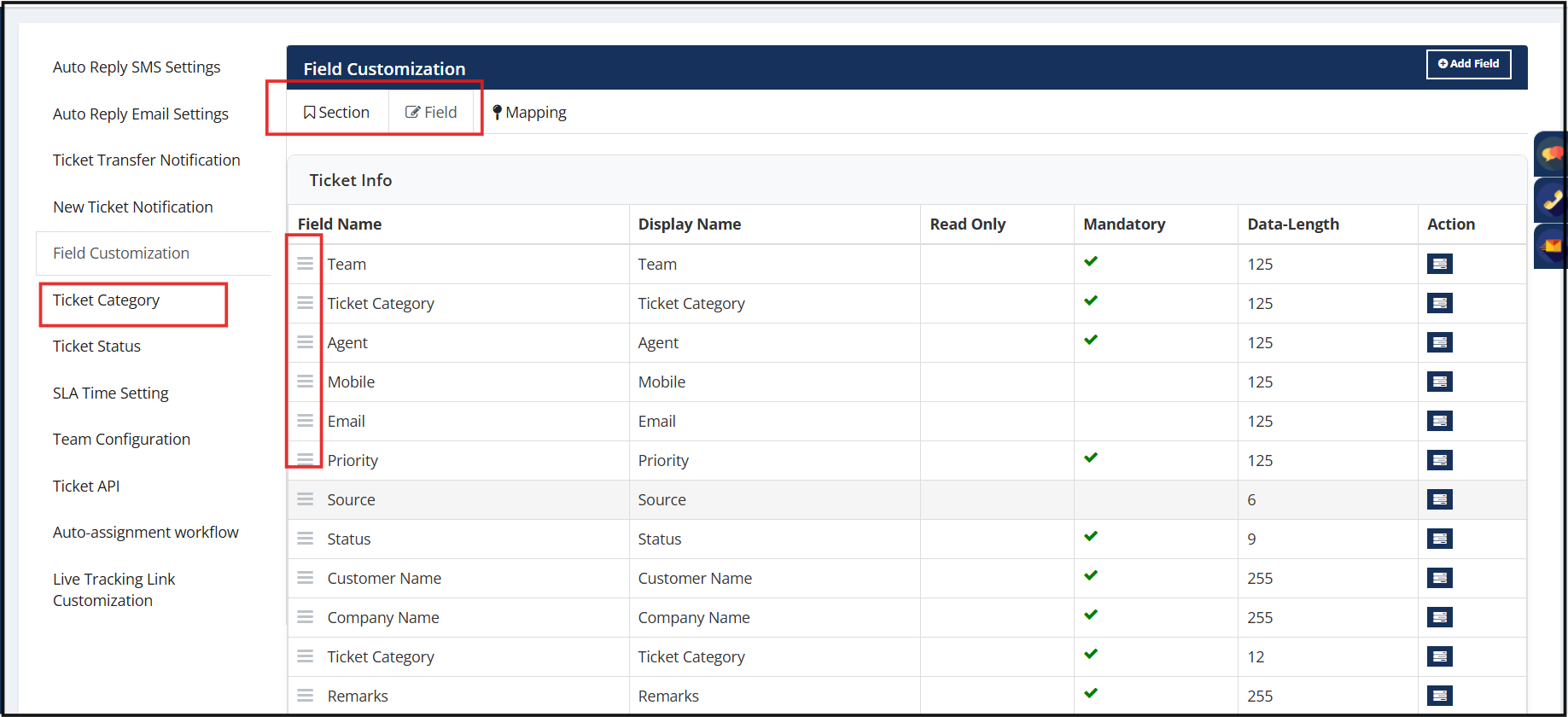
Support Box now provides greater flexibility in ticket configuration by allowing administrators to reorder Sections, Fields, and Ticket Categories using simple drag-and-drop controls.
This enhancement helps organizations design ticket forms that align more closely with their business processes, making ticket creation faster, more intuitive, and easier for agents to navigate.
What's New
Section Reordering
- Administrators can now rearrange ticket sections using drag-and-drop functionality.
- Changes are reflected immediately in the New Ticket screen, allowing organizations to prioritize the most important information and create a more logical ticket layout.
Advanced Field Reordering
- Fields can now be reordered both within the same section and across different sections.
- This provides significantly greater flexibility when designing ticket forms and organizing information based on operational requirements. This enables more powerful form customization and layout management.
Ticket Category Reordering
- Ticket Categories can now be reordered through drag-and-drop controls.
- Organizations can prioritize frequently used categories by placing them at the top of the list, helping agents select categories more quickly during ticket creation.
Why It Matters
Every organization follows a different support process. Fixed layouts often force agents to work around the system instead of working with it.
With configurable ordering, administrators can structure ticket forms around actual business workflows, ensuring that the most important fields, sections, and categories appear where users need them most.
Key Benefits
• Fully customizable ticket layouts
• Faster ticket creation and data entry
• Better alignment with business workflows
• Improved agent productivity and usability
• Greater flexibility in ticket form design
• Reduced effort in locating frequently used categories and fields



.png)


.png)